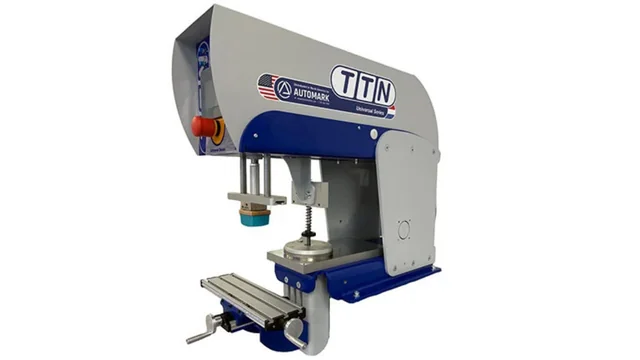
Pad printing is a precise and versatile printing method used to transfer 2D images onto 3D objects, commonly used in industries such as medical, automotive, promotional products, and consumer electronics. One of the core methods used in pad printing is the open inkwell pad printer, which is especially effective for short to medium production runs.
Through the diagrams below, we provide a step-by-step visual explanation of how the pad printing process works using an open inkwell pad printer. This breakdown is designed to give you a clearer understanding of each stage in the cycle—from ink pickup to final image transfer onto the part.
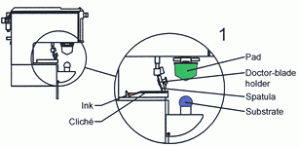
By illustrating the complete pad printing cycle, these diagrams highlight the interaction between the inkwell, doctor blade, cliché (printing plate), pad, and the substrate (the part being printed). Whether you’re new to pad printing or looking to better understand how open inkwell pad printers operate compared to closed cup systems, this guide will help deepen your knowledge of the mechanics behind the process.
Explore the full cycle below to see how the open inkwell pad printer enables consistent ink transfer, precise registration, and high-quality print results—even on complex, curved, or uneven surfaces.
0
The starting point. In this position, the cliché is covered with ink that is in the inkwell. The image in the cliché is filled with ink after the spatula moves forward depositing ink across the entire plate. The depth of the cliché image is carefully engraved to approximately 25 microns.
0
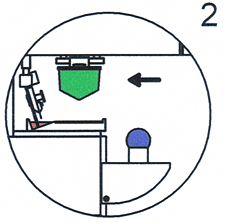
The pad and the doctorblade holder (with the doctorblade) move back. The doctorblade scrapes all the excess ink backwards. From the moment ink is left in the recessed image area of the cliché, the outside air begins to evaporate making the top layer of the ink tacky. This tacky ink is important and is relied upon by the pad to pull the ink from the recessed image.
0
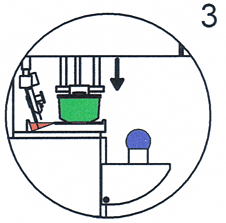
The silicone pad picks up the ink from the cliché. Because the top layer of the ink has become sticky, the ink will be pulled off the cliché by the pad. The force which the pad comes into contact with the ink must be adjusted as low as possible. Excessive force can deform the printed image.
0
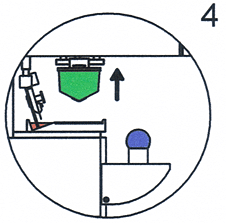
The pad moves up and pulls the ink off the cliché. From that moment on, the bottom of the ink layer is now exposed to the air becoming tacky. The thinner begins to evaporate from the exposed side of the image.
0
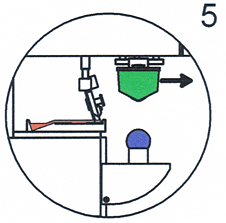
At the same time the pad is moving forward to get into the position to deposit the image onto the part, the doctorblade holder and spatula move forward, once again filling the cliche and the recessed image with the ink to print on the part. The pad is now above the product to be printed.
0
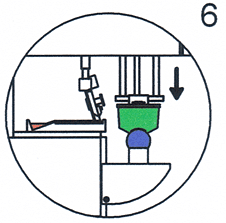
The pad moves downwards and presses onto the product. The ink is transferred from the pad to the product. The force with which the printing is done is not important for the transfer of the ink. The mere touch of the pad ensures transfer. At this step, the lowest possible pressure is necessary to prevent deformation.
0
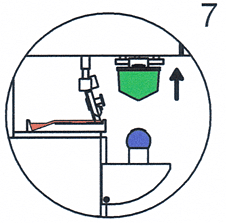
The pad moves back up to the starting position. The pad printer is now ready for the next cycle. This entire process from steps 1-7, is measured in mere seconds.
Have questions about how open inkwell pad printing works or wondering which system is best suited for your product or production needs? Get in touch with our team today for expert advice, customized solutions, and in-depth support tailored to your application.